The everyday office productivity playbook

Your workday is full of small tasks that quietly steal your evening.

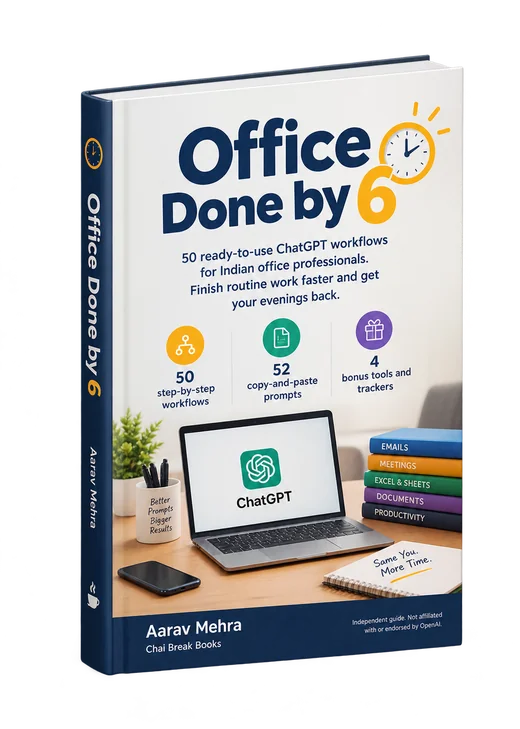
Discover 50 practical ChatGPT workflows for emails, Excel, meetings, reports and everyday office tasks, so you spend less effort starting from scratch and make more room for life beyond work.

  • 50step-by-step workflows
  • 52copy-and-paste prompts
  • 4bonus tools and trackers

Complete PDF Ebook — ₹499one-time price

Get This Ebook — ₹499

Digital PDF • One-time purchase • Download after successful payment

See everything included ↓

Independent guide. Not affiliated with or endorsed by OpenAI, Microsoft or Google.

Office Done by 6 ebook by Aarav Mehra, Chai Break Books

Sound familiar?

The office has thinned out, but you are still at your desk.

Often it isn't one big, important task that keeps you there. It's twenty small ones.

Adapted from the book's introduction.

  • Rewriting a routine follow-up email for the third time because the tone still feels off.
  • Turning rough notes into a report someone else can actually read.
  • Scrolling a 40-message email thread to work out what was decided.
  • Typing up meeting minutes long after the meeting has ended.
  • Searching four websites for the right Excel formula.
  • Rebuilding the same checklist or presentation format from scratch.
  • Deciding, again, which of ten things to do first.

None of these tasks is difficult. Together, they eat the day.

What helps is a repeatable approach: the same few steps, a ready-made prompt, and a quick check before anything leaves your hands.

The solution

Meet Office Done by 6

A practical guide to using ChatGPT for the repetitive writing, organising, summarising and planning that fills most office jobs in India. No coding. Each workflow gives you instructions and a realistic worked example, not just a list of prompts.

  1. Prepare

    Collect the notes, thread or small anonymised table the task needs.

  2. Prompt

    Copy the guided master prompt and fill in the [PLACEHOLDERS].

  3. Review

    Check facts, numbers, assumptions and tone with the built-in checklist.

  4. Use

    Paste the result into Outlook, Gmail, Excel, Sheets, PowerPoint or WhatsApp.

Every workflow follows the same layout

So you always know where to look, even on a busy day.

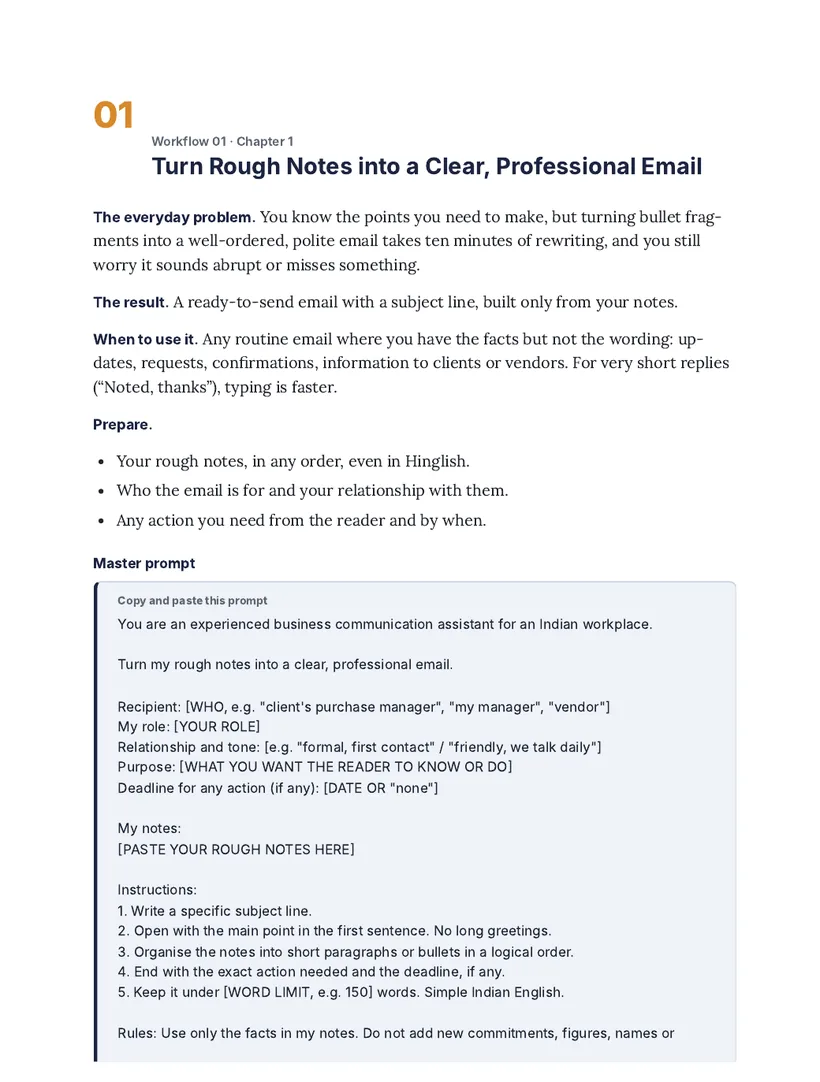
  • The everyday problemThe situation you'll recognise.
  • The resultExactly what you'll produce.
  • When to use itAnd when typing it yourself is faster.
  • PrepareWhat to collect before prompting.
  • Master promptCopy, fill the placeholders, paste.
  • Worked exampleSample input and output from a fictional Pune company.
  • Check before you use itThree to five quality checks.
  • Privacy noteWhat to keep out of ChatGPT.
  • Time estimateConservative and illustrative, with space to track your own.

The method behind every prompt

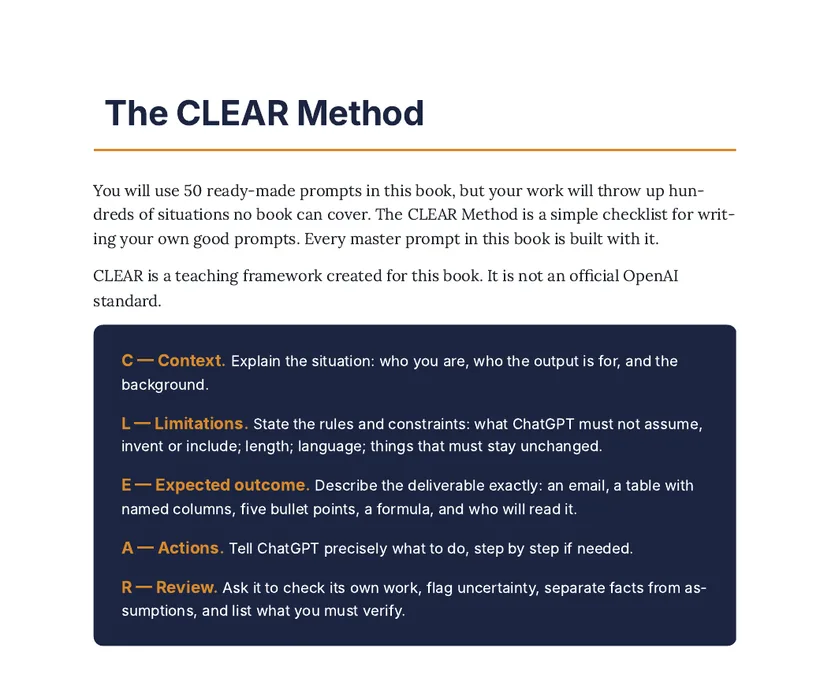
The CLEAR Method

  • ContextWho you are, who the output is for, and the background.
  • LimitationsWhat ChatGPT must not assume, invent or include; length; language.
  • Expected outcomeThe exact deliverable: an email, a table with named columns, a formula.
  • ActionsPrecisely what to do, step by step if needed.
  • ReviewAsk it to flag uncertainty, separate facts from assumptions, and list what to verify.
A short CLEAR prompt, from the book I'm an HR executive (C). Using only the points below and nothing else (L), write a 5-bullet WhatsApp announcement for all staff (E) about the Diwali holiday dates; put the most important date first (A). Then tell me anything that looks unclear (R).

CLEAR is the teaching framework created for this ebook. It is not an official OpenAI standard.

What's inside

50 practical workflows for the work you actually do

Ten chapters, grouped by type of work. Open any chapter to see its five workflows, exactly as titled in the book.

Chapter 1

Email and Everyday Work Communication

Rough notes to professional emails, long-thread summaries, follow-ups and reminders, and difficult news delivered professionally.

See the 5 workflows
  1. 01Turn Rough Notes into a Clear, Professional Email
  2. 02Summarise a Long Email Thread into Decisions, Open Questions, and Next Actions
  3. 03Adapt the Same Message for a Manager, Colleague, Client, or Senior Executive
  4. 04Write Professional Follow-Up and Reminder Messages Without Sounding Pushy
  5. 05Communicate Delays, Mistakes, Difficult News, or Changing Deadlines Professionally

Chapter 2

Meetings and Follow-Ups

Agendas, meeting briefs, structured minutes, decisions and action lists with owners and deadlines.

See the 5 workflows
  1. 06Create a Focused Meeting Agenda from a Desired Outcome
  2. 07Prepare a Meeting Brief from Existing Documents and Notes
  3. 08Convert Meeting Notes into Structured Minutes
  4. 09Extract Decisions, Action Items, Owners, and Deadlines from Meeting Notes
  5. 10Draft Individual Follow-Up Messages for Different Action Owners

Chapter 3

Excel, Google Sheets, and Everyday Data Tasks

Formula help in plain English, data-cleanup planning, summaries of small anonymised tables, and choosing the right pivot or chart.

See the 5 workflows
  1. 11Ask ChatGPT to Explain an Unfamiliar Excel Formula in Plain English
  2. 12Generate an Excel or Google Sheets Formula from a Plain-English Requirement
  3. 13Identify Inconsistent Dates, Text Formats, Duplicates, and Missing Values, and Plan a Safe Cleanup
  4. 14Convert a Small, Anonymised Data Table into a Clear Summary of Important Patterns
  5. 15Choose the Right Pivot Table, Chart, or Calculation for a Business Question

Chapter 4

Reports, MIS, and Documentation

Weekly status reports, MIS narratives from verified figures, summaries for busy managers, and step-by-step SOPs.

See the 5 workflows
  1. 16Convert Daily Work Notes into a Structured Weekly Status Report
  2. 17Turn Verified Business Figures into a Readable MIS Narrative
  3. 18Summarise a Long Report for a Busy Manager
  4. 19Investigate a Work Problem by Separating Facts, Hypotheses, and Missing Evidence
  5. 20Turn an Existing Process into a Step-by-Step Standard Operating Procedure

Chapter 5

Presentations and Clear Thinking

Slide outlines, headlines and speaker notes, simpler explanations of jargon, and a review for gaps and unsupported claims.

See the 5 workflows
  1. 21Convert a Report into a Logical Presentation Outline
  2. 22Generate Slide Headlines, Supporting Points, and Speaker Notes
  3. 23Simplify Technical or Jargon-Heavy Content for Non-Technical Colleagues
  4. 24Adapt a Presentation for Senior Management, Clients, or an Internal Team
  5. 25Review a Presentation for Logical Gaps, Unsupported Claims, Repetition, and Missing Evidence

Chapter 6

Daily Planning and Project Coordination

Execution plans, prioritisation, risk registers, blocker escalations and recurring checklists.

See the 5 workflows
  1. 26Turn a Vague Assignment into a Step-by-Step Execution Plan
  2. 27Prioritise a Large Task List Using Deadlines, Importance, Dependencies, and Effort
  3. 28Build a Practical Project Risk Register
  4. 29Prepare a Clear Blocker Escalation Message That Includes Possible Solutions
  5. 30Create Repeatable Checklists for Recurring Office Responsibilities

Chapter 7

Research and Better Workplace Decisions

Vendor comparisons, research plans and source evaluation, weighted decision matrices and feedback themes.

See the 5 workflows
  1. 31Compare Vendor Proposals Against Consistent Criteria
  2. 32Create a Research Plan and Evaluate the Reliability of Sources
  3. 33Build a Weighted Decision Matrix for Competing Options
  4. 34Categorise Anonymised Customer Feedback into Recurring Themes and Questions
  5. 35Prepare the Right Questions Before a Review, Vendor Discussion, or Important Decision

Chapter 8

Customer Service, Sales, and Client Management

Complaint responses, proposal outlines, customer FAQs, discovery questions and corrective-action plans.

See the 5 workflows
  1. 36Draft a Calm, Helpful Response to a Customer Complaint
  2. 37Turn a Client Brief into a Structured Proposal Outline and Scope-of-Work Draft
  3. 38Convert Existing, Approved Information into a Clear Customer FAQ
  4. 39Prepare Discovery Questions for a Sales Call or Client Meeting
  5. 40Document a Service Failure, Investigate Possible Causes, and Prepare a Corrective-Action Plan

Chapter 9

HR, Administration, and Knowledge Sharing

Job descriptions, interview questions and rubrics, onboarding checklists, training guides and policy reviews.

See the 5 workflows
  1. 41Draft a Practical Job Description from Approved Role Requirements
  2. 42Prepare Structured Interview Questions and a Consistent Evaluation Rubric
  3. 43Create an Employee Onboarding Checklist from an Existing Process
  4. 44Convert an SOP into a Simple Employee Training Guide
  5. 45Review a Draft Internal Policy for Clarity, Ambiguity, and Missing Operational Details

Chapter 10

Reclaim Your Time and Enjoy Life Beyond Work

End-of-day shutdown summaries, tomorrow's plan, a weekly time audit, and a schedule that protects time for life outside work.

See the 5 workflows
  1. 46Turn an End-of-Day Work Log into a Clean Shutdown Summary
  2. 47Prepare Tomorrow's Plan from an Approved Task List and Calendar Information
  3. 48Conduct a Weekly Time Audit to Identify Work That Could Be Simplified, Delegated, Standardised, or Automated
  4. 49Design a Realistic Weekly Schedule That Protects Time for Family, Exercise, Hobbies, Learning, or Personal Interests
  5. 50Turn a Personal Goal into a Manageable 30-Day Plan That Fits Around a Normal Working Week
Also in the book: Introduction: Why This Book Exists · Getting Started with ChatGPT at Work · The CLEAR Method · Putting It Together: A Workday with the System · four bonus tools · Conclusion: Work Done, Evening Back · References.

The complete package

Not just prompts. A repeatable way to get work done.

The core ebook

  • 50 step-by-step workflows
  • 52 copy-and-paste prompts
  • Ten practical work categories
  • Worked examples based on fictional Indian workplace scenarios
  • Instructions for preparing inputs, reviewing results and using the output

The learning system

  • Getting Started with ChatGPT at Work
  • The CLEAR Method for writing your own prompts
  • Quality-control checklists in every workflow
  • Privacy and responsible-use reminders, including how to replace sensitive details with placeholders

The four bonus resources

  1. The 15-Minute Weekly AI ReviewA short weekly routine to decide which workflows to keep, improve or drop.
  2. Prompt Customisation Cheat SheetAdd-on lines for tone, tables, word limits, placeholders, Indian number formats and simple Hindi.
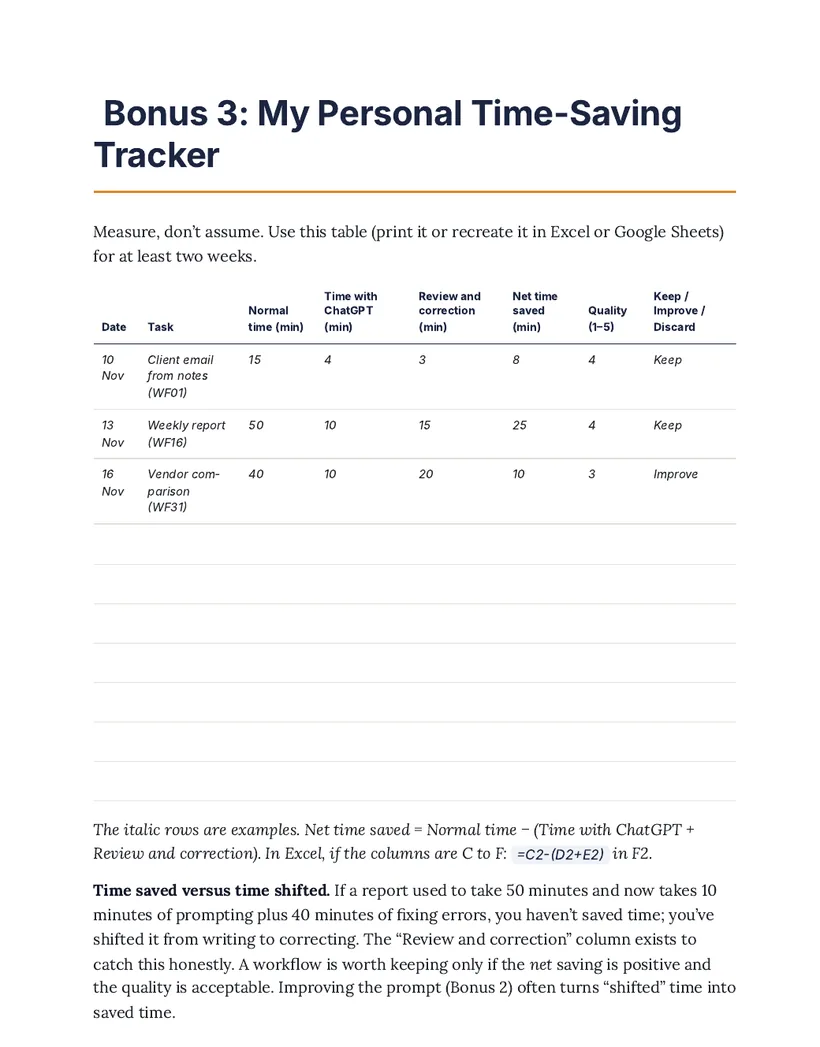
  3. My Personal Time-Saving TrackerRecord normal time, time with ChatGPT and review time, so you measure net savings honestly.
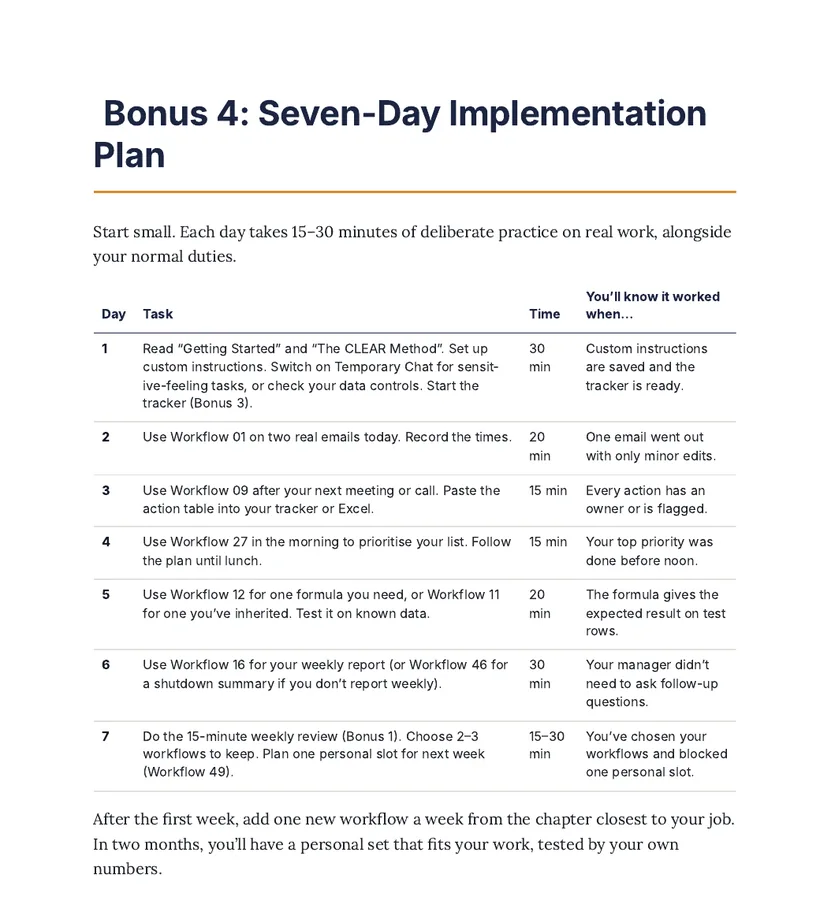
  4. Seven-Day Implementation Plan15–30 minutes a day of practice on real work, one or two workflows at a time.

The bonuses are sections inside the same PDF. The tracker is a table you can print or recreate in Excel or Google Sheets.

How it works

From your next real task to a reviewed first draft

  1. Choose a workflow

    Pick the one that matches a task on your list today: an email, minutes, a formula, a report.

  2. Prepare and fill in

    Gather your information and replace the prompt's [PLACEHOLDERS] with your own details.

  3. Let ChatGPT draft or organise

    Paste the prompt into your own ChatGPT account and get a first draft, table or plan.

  4. Review, correct, apply

    Run the checklist, fix anything wrong, then use the result in your normal work tools.

ChatGPT can sound confident and still be wrong, especially with calculations, formulas, dates and summaries. Always review the output. Your employer's AI and confidentiality policies come first.

"Can't I find this free on YouTube?"

You can find free prompts online.

The challenge is turning scattered information into a reliable workflow you can actually use at work. That is what this book organises for you.

An organised sequence

Ten chapters by type of work, so you go straight to the task in front of you.

Ready-made prompts

52 prompts built with the CLEAR Method, with clear [PLACEHOLDERS] to fill.

Worked examples

Every workflow shows a sample input and output, set in a fictional Indian company.

Quality-control steps

Three to five checks per workflow for facts, numbers, assumptions and tone.

Privacy guidance

What never to paste, and how to anonymise names, numbers and client details.

A way to measure

The time-saving tracker shows whether a workflow helps you, so you keep only what works.

You're paying for structure and convenience: the sequence, prompts, examples and checks in one place. Basic ChatGPT knowledge is widely available, and the book doesn't claim otherwise.

Look inside

Real pages from the ebook

Tap a page to see it larger.

Page from the ebook explaining the CLEAR Method: Context, Limitations, Expected outcome, Actions, Review View
The CLEAR MethodPage 13
Workflow 01 page from the ebook showing the everyday problem, result, preparation list and the start of the master prompt View
Workflow 01 and its master promptPage 17
Bonus 3 page from the ebook: a time-saving tracker table with example rows View
Personal Time-Saving TrackerBonus 3, page 142
Bonus 4 page from the ebook: a seven-day implementation plan table View
Seven-Day Implementation PlanBonus 4, page 144

Actual pages from the PDF, some shown in part. The full ebook is 147 pages.

Is it right for you?

Who this ebook is for

It may be a good fit if you are

  • An office professional who writes emails and reports again and again
  • Part of an operations, sales or administrative team
  • In HR, MIS or accounts and want more structure for routine tasks
  • Someone who learns best by copying and adapting examples
  • A beginner who prefers step-by-step instructions to technical explanations

It may not be the right fit if you are

  • Expecting ChatGPT to do your entire job automatically
  • Looking for a coding course or an advanced AI engineering guide
  • Expecting guaranteed hours saved, a promotion, income or error-free AI output
  • Needing a fully automated integration with your company's software

About the book

Exactly what you're buying, and from whom

Title
Office Done by 6: 50 Ready-to-Use ChatGPT Workflows for Indian Office Professionals
Author
Aarav Mehra (pen name)
Publisher
Chai Break Books, an imprint of Ketan Enterprise, Vadodara, Gujarat, India
Edition
First edition, October 2026
Format
Downloadable PDF ebook, 147 pages. Not a printed book.
You receive
One PDF containing all 50 workflows, 52 prompts, the CLEAR Method and the four bonus resources
Licence
For the personal use of the original purchaser

Independent. This ebook is not affiliated with, sponsored by or endorsed by OpenAI, Microsoft or Google. ChatGPT is a trademark of OpenAI; Excel is a trademark of Microsoft; Google Sheets is a trademark of Google.

AI can be wrong. The book teaches you to check every output. You remain responsible for anything you send, submit or decide.

General guidance. The book teaches productivity methods. It is not legal, tax, financial, HR, medical or cybersecurity advice.

Get your copy

One book. One price.

Office Done by 6

50 Ready-to-Use ChatGPT Workflows for Indian Office Professionals

  • Complete PDF ebook
  • 50 step-by-step workflows
  • 52 copy-and-paste prompts
  • The CLEAR Method
  • Four bonus tools and trackers

₹499one-time purchase

Get This Ebook — ₹499

Delivered digitally. After successful payment you'll be taken to a page with your PDF download button.

Questions

Frequently asked questions

What exactly is Office Done by 6?

A downloadable PDF ebook of 50 ready-to-use ChatGPT workflows for Indian office professionals. Each workflow covers one everyday task, such as an email, meeting minutes, a formula or a weekly report, with a master prompt, a worked example and checks to run before you use the result.

What do I receive when I purchase it?

One PDF file (147 pages) containing:

  • 50 step-by-step workflows across ten chapters
  • 52 copy-and-paste prompts
  • Getting Started with ChatGPT at Work and the CLEAR Method
  • Four bonus resources: the 15-Minute Weekly AI Review, Prompt Customisation Cheat Sheet, Personal Time-Saving Tracker and Seven-Day Implementation Plan

The bonuses are sections inside the same PDF, not separate files or software. ChatGPT access is not included.

Is this suitable for beginners?

Yes. As the book puts it: if you can write an email, you can write a good prompt. The Getting Started section covers opening a conversation, giving context, refining answers, protecting confidential information and checking every output, before you reach Workflow 01.

Do I need coding skills?

No. Every workflow uses plain-language prompts that you copy, fill in and paste. Automated integrations with company software are not covered, because they need IT setup and approval.

Which office tasks does it cover?

Email and work communication; meetings and follow-ups; Excel, Google Sheets and everyday data tasks; reports, MIS and documentation; presentations; daily planning and project coordination; research and workplace decisions; customer service, sales and client management; HR, administration and knowledge sharing; and reclaiming time for life beyond work. See all 50 workflow titles.

Can I use these workflows with my own ChatGPT account?

Yes. The workflows are written for you to use in your own ChatGPT account, through the website or the mobile or desktop app. The purchase does not include a ChatGPT account or subscription. Always follow your employer's rules on which AI tools you may use for work.

Do I need a paid ChatGPT subscription?

Most workflows ask you to paste text, such as notes, an email thread or a small table. The book notes that this works on every ChatGPT plan. Features such as attaching files, Memory and usage limits depend on your plan, app and the current product version, and they change often, so check what your account offers.

Will ChatGPT always give the correct answer?

No. ChatGPT can produce answers that sound confident but are wrong, including calculations, formulas, dates and summaries. That is why every workflow ends with quality checks, and why the prompts ask ChatGPT to label assumptions and list what you should verify. You remain responsible for anything you send or decide.

Will the ebook save me a guaranteed number of hours?

No. The time estimates in the book are conservative and illustrative, not measured guarantees. Your results depend on your job, your tools and how well a workflow fits. The Personal Time-Saving Tracker helps you measure your own net savings, including the time spent reviewing and correcting.

Is this an official OpenAI ebook?

No. Office Done by 6 is an independent guide. It is not affiliated with, sponsored by or endorsed by OpenAI, Microsoft or Google.

How do I receive the ebook after payment?

After your payment is successful, you are taken to a thank-you page with a "Download Your Ebook (PDF)" button. Save the PDF somewhere easy to find. If you are not redirected, or the download does not work, email with your payment reference.

Can I download the PDF again if I lose it?

Please save the PDF to your device or cloud storage straight after downloading. [INSERT YOUR RE-DOWNLOAD POLICY]

Can I share the PDF with colleagues?

The ebook is licensed for the personal use of the original purchaser, so it may not be copied, shared or resold. You may copy the prompts into ChatGPT or another AI assistant for your own work. For copies for a team, contact the publisher.

How can I contact the publisher?

Email Chai Break Books (Ketan Enterprise) at .

What is the refund policy?

[INSERT YOUR REFUND POLICY]

Your work matters. Your life outside work matters, too.

Work is an important part of life, but it should not consume all of life.

The aim is simple: make everyday office tasks more manageable, and find a handful of workflows worth keeping. What you do with any time you get back is up to you.

Get Office Done by 6 — ₹499

PDF ebook · 50 workflows · 52 prompts · CLEAR Method · 4 bonus tools